Four practices, by how you feel
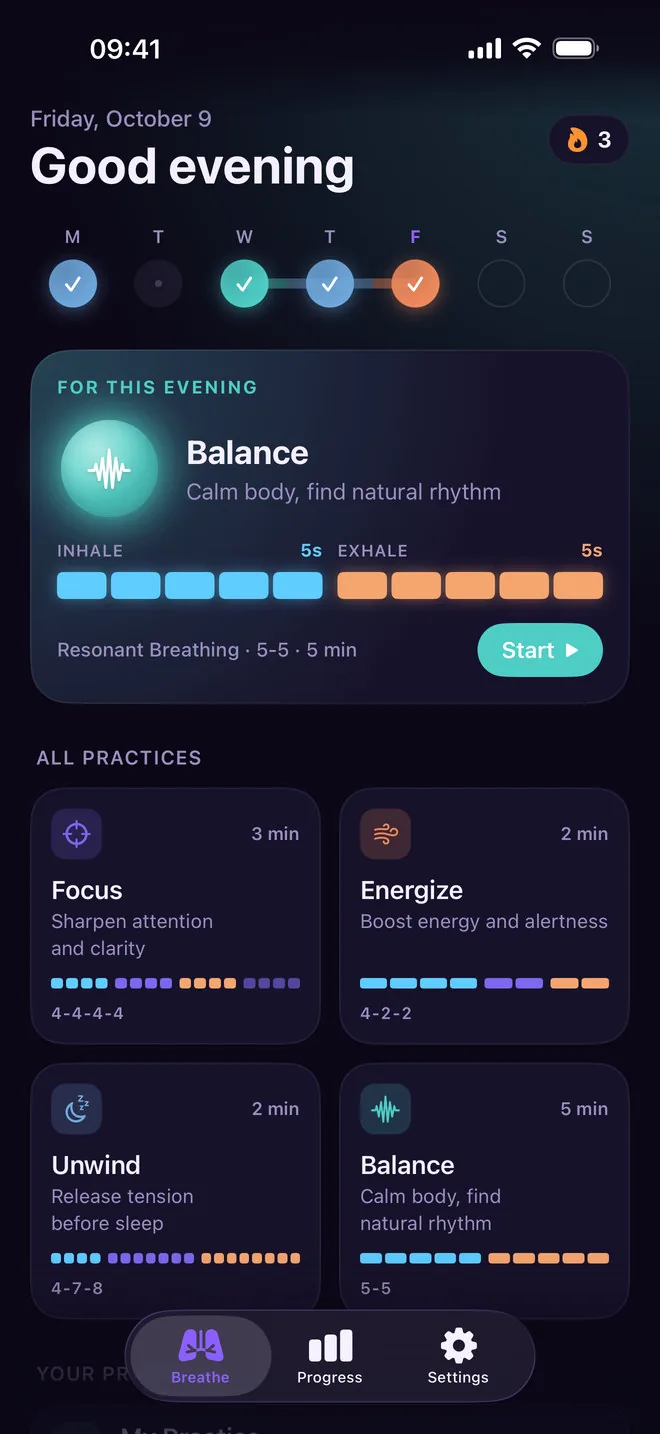
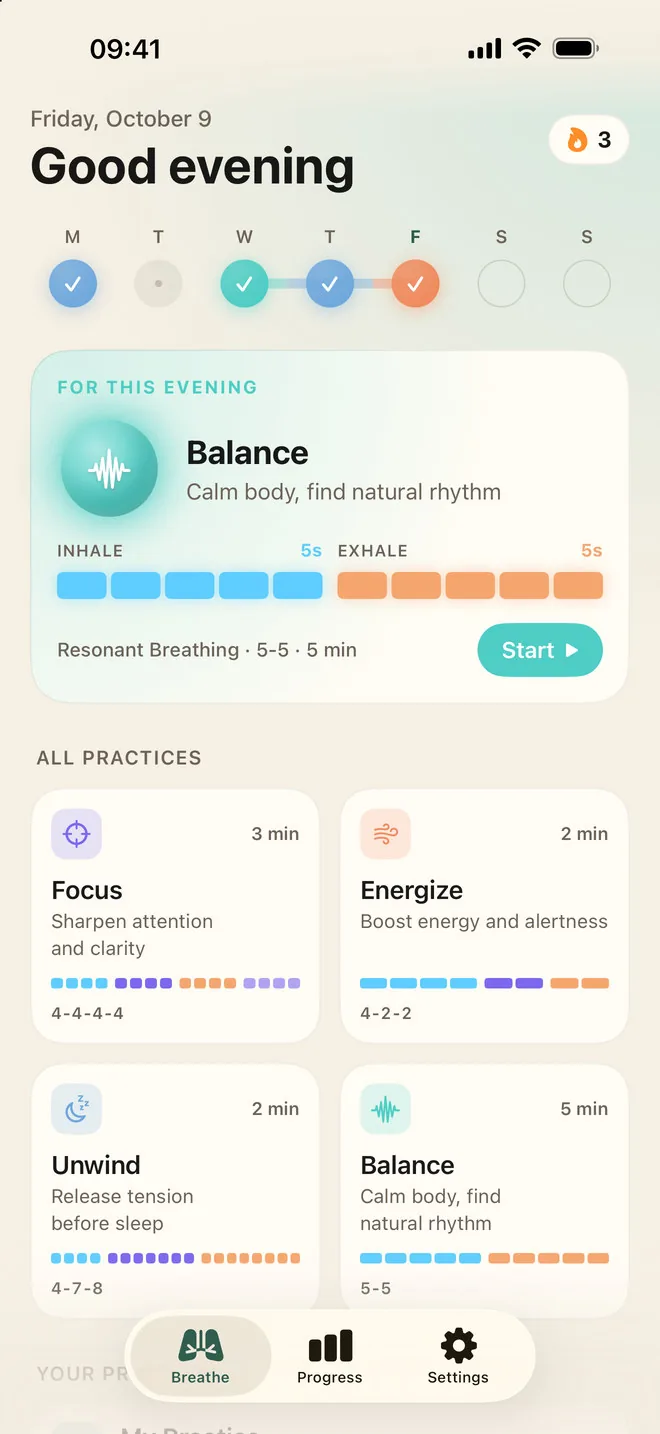
Focus is box breathing, 4-4-4-4. Energize is 4-2-2. Unwind is the 4-7-8 breath for sleep. Balance is resonant breathing at 5-5, about six breaths a minute.
Guided breathing for iPhone
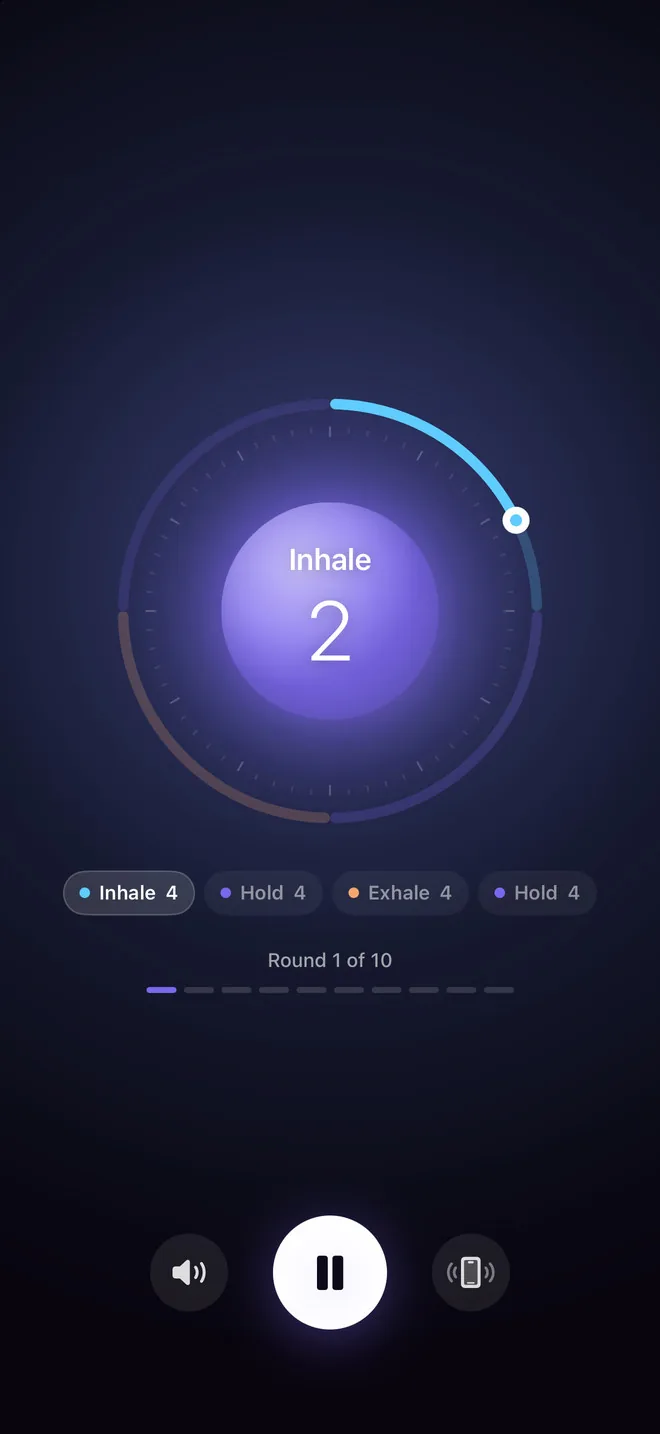
Pick how you want to feel and follow the ring: breathe in while it fills, hold, let it go. A quiet voice and gentle haptics count every second for you, before a hard call, at night, or whenever your thoughts won't slow down.
Download on the App StoreFree to start: one full session a day. No account. 31 languages.
Features
Four breathing practices and just enough around them to make each one easy to follow. No lectures, no feed, no account.
Focus is box breathing, 4-4-4-4. Energize is 4-2-2. Unwind is the 4-7-8 breath for sleep. Balance is resonant breathing at 5-5, about six breaths a minute.
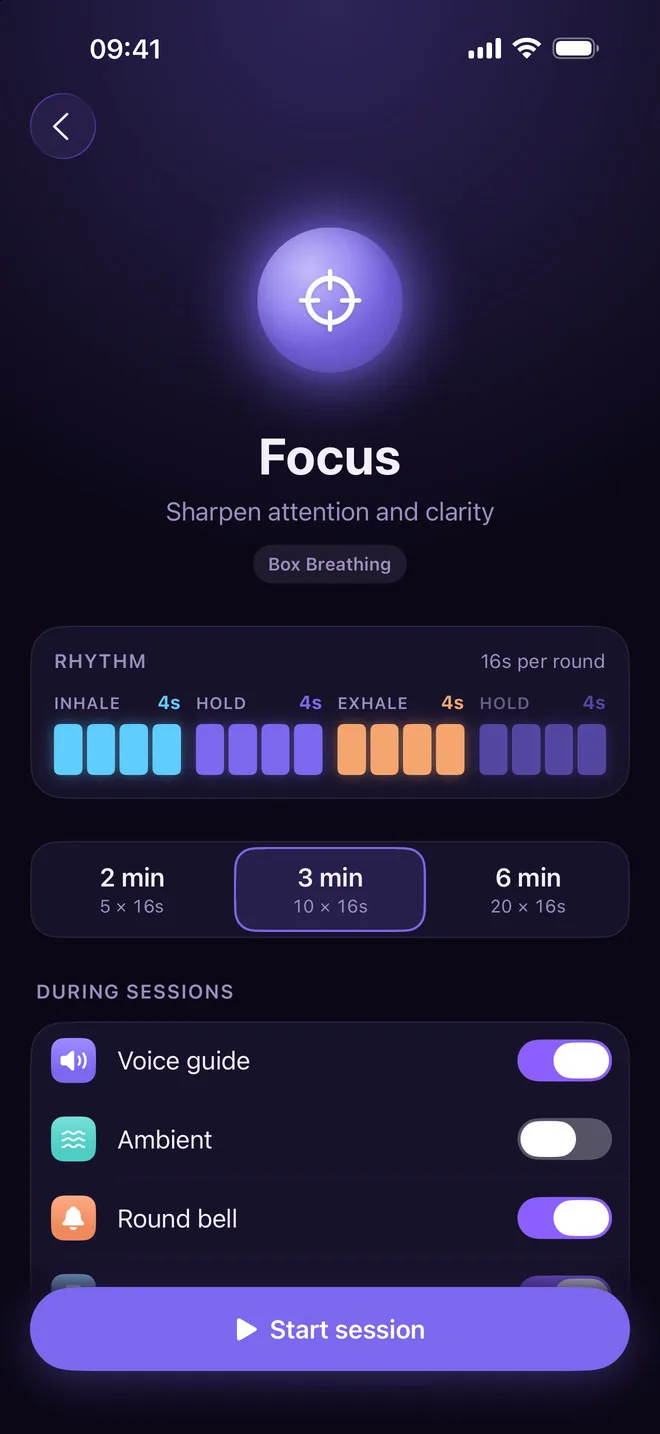
Every practice comes in three lengths. Focus runs 2, 3 or 6 minutes, and a short Unwind takes about one.
Spoken cues for every inhale, hold and exhale, in English or Russian. Close your eyes and listen, or switch the voice off.
The phone swells in your hand on the inhale, beats softly like a heart on the holds and goes still on the exhale.
Two soundscapes to breathe over, Stillness and Crystal Piano, and a soft bell that marks the end of each round.
Lock the phone or put it face down. The session carries on, and a Live Activity on the Lock Screen and in the Dynamic Island shows the phase and the seconds left.
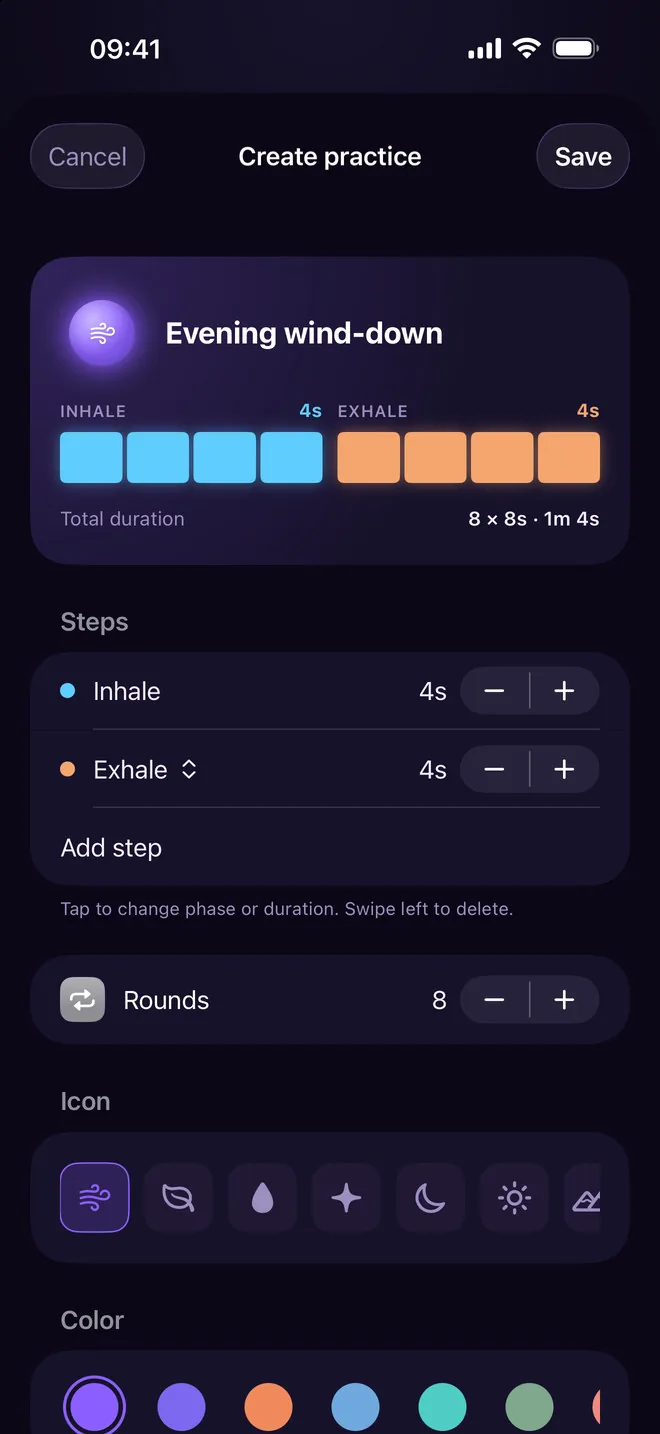
Build a rhythm step by step, set the rounds, give it an icon and a colour. It sits on Home next to the built-in four. Part of Premium.
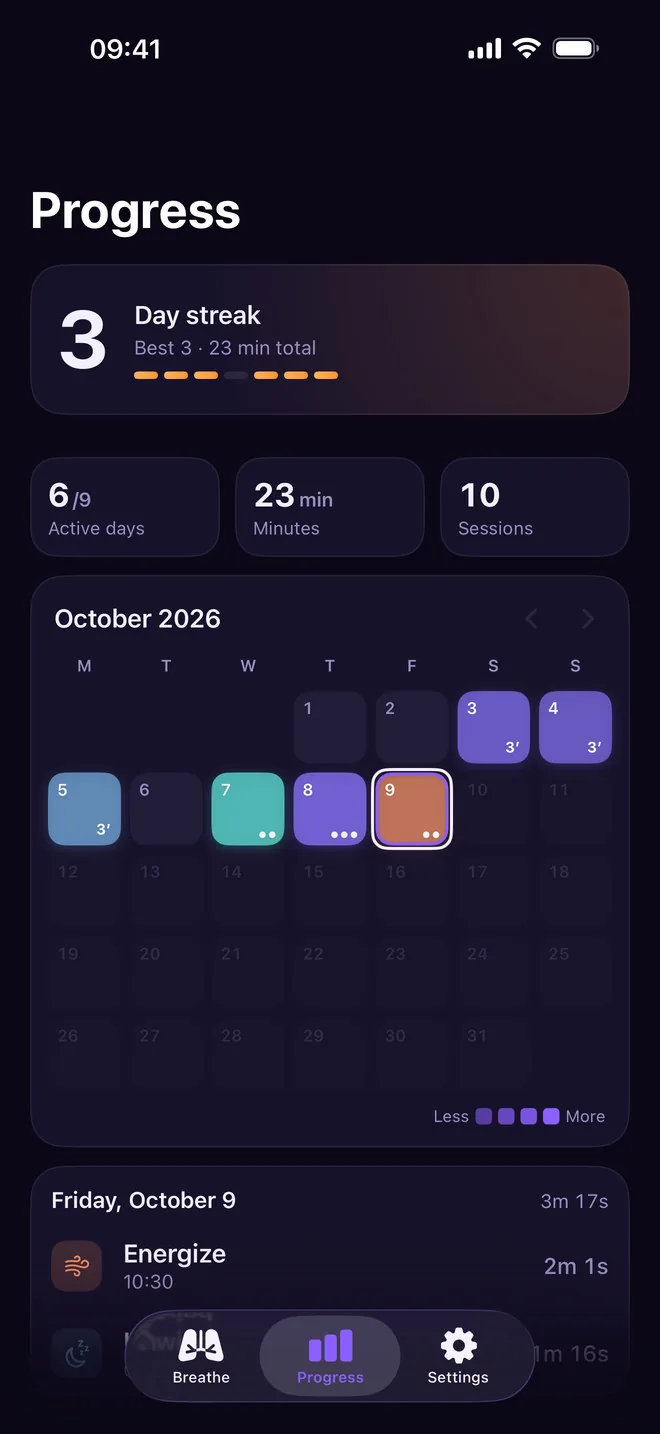
A day streak, your minutes and a month calendar. Every session can be saved to Apple Health as Mindful Minutes.
One for the morning, one for the evening, at the times you pick. Both are local notifications and free for everyone.
Try it now
This is the rhythm Hale guides you through. Pick a practice and follow the circle for a few rounds: breathe in as it grows, hold while it rests, breathe out as it shrinks.
Sharpen attention and clarity
In the app the same ring comes with a spoken cue for every phase, a bell between rounds and haptics you can feel with your eyes closed, and it keeps going with the screen locked.
Every practice
Each practice shows its rhythm as one tick per second, so 4-7-8 is literally four, seven and eight. Choose a length and the sound you want, then start.
Premium
Put inhale, hold and exhale steps in any order, set each one to the second and choose how many rounds. Hale shows the total length while you edit.
Progress
No scores and no badges. Just the days you showed up, coloured by the practice you chose, and how long you breathed.
Light and dark
Hale follows the system theme, or you pick light or dark in Settings. Sessions always run on the dark screen, so the ring stays easy on the eyes at night. The app language is yours to choose too, separately from the phone's.
FAQ
Yes, to start. Every day you get one full session of any of the four practices; the count resets at midnight. Premium removes the limit and adds your own practices. It is a monthly subscription with a 7-day free trial, or a one-time Lifetime purchase. The App Store shows the price in your currency.
Unwind (4-7-8) before sleep, Focus (box breathing) when your head is busy, Energize in the morning or before work, Balance whenever you need to settle. Home also suggests one for the time of day.
Yes. The voice, haptics and ambient sound carry on in the background, and you can pause or resume from the Lock Screen. The Live Activity shows the phase, the seconds left and the round.
Hale takes over the audio so the voice cues and the Lock Screen controls work, the same way other meditation apps do. If you want something underneath your breathing, switch on one of Hale's ambient soundscapes.
If you allow it, every session is written to Apple Health as Mindful Minutes. A session you end early still counts once it has lasted a minute or half of its rounds.
No account, no email, no ads. Your session history is stored on your device and in your private iCloud. Hale sends anonymous usage stats through TelemetryDeck (for example, that a session started) to see which features matter. Details are in the privacy policy.
The app is translated into 31 languages, and you can pick one in Settings separately from your phone's language. The voice cues are in English and Russian.
Yes. Hale runs on iPhone and iPad with iOS 17.2 or later, and your history syncs between them through iCloud.
No. Hale is a breathing guide that helps you slow down in the moment. If anxiety, panic or sleep problems are getting in the way of your life, please talk to a doctor.
More apps
Clean, focused tools built for everyday life on iPhone.
 Skyward
Tells you when and where to look tonight — meteor showers, the Moon and planets for your city — with a sky map you hold up to the sky.
Skyward
Tells you when and where to look tonight — meteor showers, the Moon and planets for your city — with a sky map you hold up to the sky.
 Quitwell
Counts the days without it — alcohol, nicotine, vaping or anything you decided to leave behind — with milestones and the money you keep.
Quitwell
Counts the days without it — alcohol, nicotine, vaping or anything you decided to leave behind — with milestones and the money you keep.
 Revera
Restores old photographs — colour, tears and scratches — and leaves the face exactly as it was.
Revera
Restores old photographs — colour, tears and scratches — and leaves the face exactly as it was.
 Surfbreak
Surf forecast for 183 spots across Indonesia — then your Apple Watch counts every wave you ride.
Surfbreak
Surf forecast for 183 spots across Indonesia — then your Apple Watch counts every wave you ride.
 RopeFlow
Jump rope workouts with automatic jump counting, XP, streaks and achievements — for iPhone and Apple Watch.
RopeFlow
Jump rope workouts with automatic jump counting, XP, streaks and achievements — for iPhone and Apple Watch.
 Borderlog
Counts your days in every country — Schengen 90/180, 183-day tax residency and visa rules for 200+ countries.
Borderlog
Counts your days in every country — Schengen 90/180, 183-day tax residency and visa rules for 200+ countries.
 iCurrency
Currency converter for 160+ currencies and top crypto with live rates and offline mode.
iCurrency
Currency converter for 160+ currencies and top crypto with live rates and offline mode.
 Followly
See who unfollowed you on Instagram — track followers, ghosts and non-followers, privately on your device.
Followly
See who unfollowed you on Instagram — track followers, ghosts and non-followers, privately on your device.
 iHabits
Build lasting habits with streaks, a year heatmap and interactive home screen widgets.
iHabits
Build lasting habits with streaks, a year heatmap and interactive home screen widgets.
 Voca
Record meetings and interviews — Voca marks who said what and pulls out the tasks.
Voca
Record meetings and interviews — Voca marks who said what and pulls out the tasks.
 Renewly
A privacy-first subscription tracker — capture receipts on device, get reminded before every charge, and pay once.
Renewly
A privacy-first subscription tracker — capture receipts on device, get reminded before every charge, and pay once.
One full session a day is free, with all four practices.
Download on the App Store